
Creature
Proposal:
Section 1
Throughout the course I have experimenting with a lot of different project ideas and software’s that would be used to create all kinds of project ideas. While experimenting I noticed that I enjoyed modelling characters the most and the project in which character modelling was done seemed to be one my best projects due to me enjoying it the most because of this I decided to create a 3D characters and environment models to expand on my previous final project and continue progressing within my career path, With all the techniques I learnt so far I will make sure that I create a successful frozen heist scene
Section 2
Throughout the course I managed to understand many aspects of animation and game design but overall I mostly enjoyed character designs and 3D modelling which I would like to pursue within this unit. I started to look into different kind of inspiration and research for my project starting with primary research the cartoon museum which once visited will allow me to look into the history of cartoons and be able to have a good starting base for my character designs and style. While also looking into films like Wreck it Ralph (2012) and despicable me (2010) allowing me to understand different styles of cartoons used in animations especially looking into Pixar and Disney films, which are some of the top market selling animation companies. Since I would like the theme of my project to be somewhat cutsie looking into Japanese anime and manga styles and the influence of big eyes and very expressive face such as in the anime my neighbour totoro (1998)
My idea consists of modelling two cartoon like stylised characters one being a human and the other being some sort of a monster which will be modelled in a way that portrays a story with a frozen image, known as frozen heist. I wish for my model to have a somewhat close relation in similarity to the current cartoon animations styles such as Pixar, The final outcome will consist of two character in a battle like positions while making sure that both body language and facial expression really resembles the emotion and feel of the scene
Section 3
Since I want to focus mostly on the characters I will make sure to really accurately first out draw out concept art with many different facial expressions and poses that strongly represent my characters which will then be transformed into 3D models made with a combination of maya and mudbox. With the background of the scene I want to look into finer details within the props either by experimenting with bump maps ,the newer software substance painter or actual modelling techniques which would be mainly done in maya
Section 4:
I will make sure to both peer and self asses at a regular basis throughout the unit so that I know I am keeping on track with my timetable and with my actual project standards, this could also be done by having group presentations where I both get feedback from the group and will get to improve my presentation skills. I will know that im keeping on track with my project as I can reference back to my concept art and research to see how closely it resembles what I wanted and how my research influences my work. I will be able to assess the success of my finished piece if without telling someone what my model was supposed to represent, it clearly shows my theme through the use of props body language colour and emotions.
Section 5
- 1998. My Neighbor Totoro.Wikipedia. Available at: https://en.wikipedia.org/wiki/My_Neighbor_Totoro [Accessed March 22, 2017].
- 2010. Despicable Me.Wikipedia. Available at: https://en.wikipedia.org/wiki/Despicable_Me [Accessed March 22, 2017].
- The Cartoon Museum - Cartoon Museum.The Cartoon Museum - Cartoon Museum. Available at: http://www.cartoonmuseum.org/ [Accessed March 22, 2017].
- 2012. Wreck-It Ralph.Wikipedia. Available at: https://en.wikipedia.org/wiki/Wreck-It_Ralph [Accessed March 22, 2017].
Monsters inc: Pixar
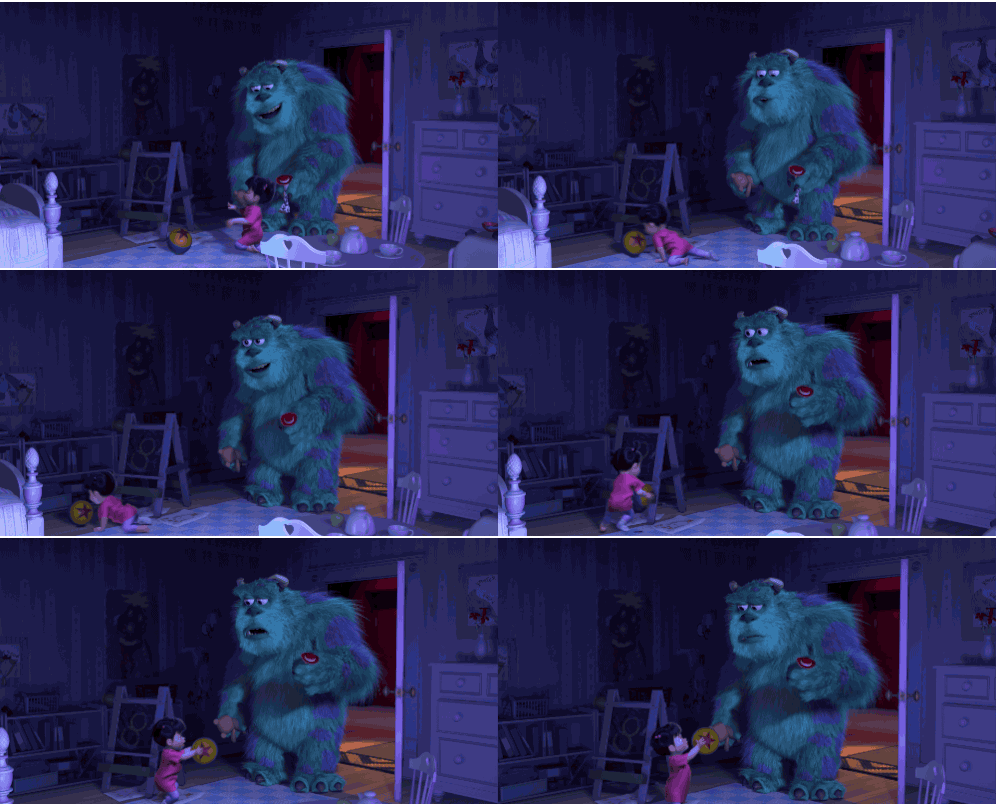
looking into the relationship between characters:
Since I am modelling two characters in a frozen heist scene I have to emphasize the emotion really well. Which meant I had to look into the relationship between the two characters of either a fight scene or a friendly type, after looking into the film monsters inc I wanted to create a somewhat similar atmosphere between the two characters resulting in the girl being interested and looking up to the 'monster'
The style of characters and scenes:
in monsters inc the style of the characters all look very friendly and somewhat based around round shapes which is something I want to be able to portray in my own work, when looking at the scene I notice that its is very basically textured with plain colours which show very basic surfaces, not only that but everything is somewhat hinted blue due to the fact its mostly based around night time similar to what I would want to achieve within my frozen heist scene


Room inspirations:
Looking at 'Boos' room from Monsters inc which i took inspiration from to model my room I took the basic style and the general furniture and toy ideas to emphasis the idea of a young girls room such as the alphabet blocks, Not only did I look at the style and the specific items in the scene I took into consideration of the whole cluttered effect which fills up all the empty space within the scene by simple placing random toys around the scene
Aamirart digital artist (Research)
When i was researching my desired idea I cam across this artist who combines models and illustrations to create final pieces such as shows here which very closely relates my idea, therefore I was able to look at the skills used to create this piece so that I was able to use them when modelling my own frozen heist scene.
What I like about this piece is the way they were able to expression the emotions through the body language colour theme and expressions of the two characters together. Which I think really completes this piece
Closely paying attention to the background furniture you notice that the pieces are somewhat curved which creates this cartoonish feel rather than a more realistic looking room, which is an aspect of her work that I would like to keep in mind when modelling my own models.


Creating a backstory: Peter Pan

I want to take into consideration the use of 'lines of actions' by recreating this scene from peter pan with my little girl looking out the window to look at the monster outside which forms a diagonal line of action, By doing this I want to emphasize on creating a back story such as the girl seeing a very familiar monster through her window which seemingly is the monster from her dreams and the drawing that she has drawn. I would express this backstory by the body language and facial expression of my characters to really exaggerate what is happening in the scene

Colour theory
Line of action
Once I have started to look into animated films in which you are shown a night scene you notice that the use of the colour blue seems to be consistent between the films which really emphases the idea of darkness rather than just darkening a scene into a rather black colour, not only will this create a realistic scene but you lose a lot of the details of the room which is why i would believe that cartoons focus on creating darkness with the colour blue . Therefore when creating the lighting of my scene i will make sure that lighting is a big factor of the final image due to the fact that this is what creates the atmosphere of the scene especially since I am creating a frozen heist scene and not an animation.


In most animations, games and in general action scenes we are faced with this idea of lines of actions. In the image shows i looked into the animated film 'the lion king' by Disney which clearly indicates a diagonal line of action between the characters, this creates depth within the scene. Looking into the use of diagonal lines of action I wish to incorporate this into my own scene so that it closely relates to the style of work at the market right now
Modelling the girls bedroom:
Using Ncloth

I have used ncloth to create gravity based models such as the duvet and pillow shown on the right, making the duvet somewhat thick but also a little creased meant that I experimented with using ncloth on a rectangular model and made sure that it did not look deflated. Once i got my desired look by playing the scene i made sure to delete the history so that my model would not change shape.

Using planes as an ncloth seemed to be slightly easier since I did not have to worry about my model looking deflated but mainly focused on how i wanted to create this messy looking draw and the way i wanted the clothes to drape which I think came out pretty succesfuly
Ncloth video
Untextured
The reason I wanted to emphasise a lot on the fabrics within the scene is due to the fact that my inspirational images such as off ' boo's room' creates a very cluttered like effect with all the random bits and bots within the scene. I wanted to recreate this feel with my own model as it too is of a little girls room , but instead of modelling different types of toys as this would take too much time so I created the same effect by using Ncloth and creating pieced of clothing scattered around the room.
When making my different cloths , pillows and bedsheets I used the following Ncloth technique to stimulate the feeling of what you would consider a ' messy bedroom' it allows me to create depth and detailing in objects like bedsheets as you'd never find a dead straight bed sheet which is why Ncloth was used instead of manually playing around with soft selection and vertices to create creases and depth within the model

Here are just models that I have made in Maya 2017 which are meant to express a Pixar style child's somewhat messy bedroom. I have tried to keep the polygon count somewhat low but also be able to create a detailed piece in the end. I think the models were successful although i feel like I need a lot more going on and maybe model small objects to scatter around the room filling in all the empty spaces.
Colour temperature:


Along the way I looked into different ways of ligtening up my indoor scene but still making sure that it create the late at night atmosphere. From my research I noticed that most of the lighting made inside a room is hinted blue, to be able to achieve this look I looked into colour temperatures of Arnold lighting so that i can create cold blue lighting
Modelling the little girl


Inspiration


Clothes and body
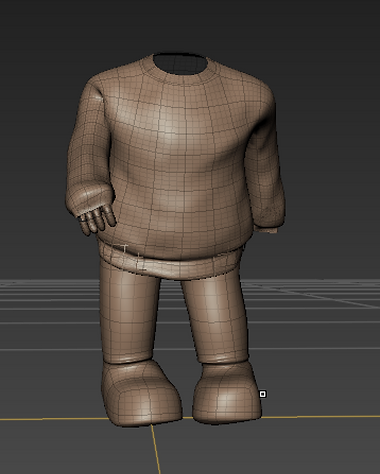
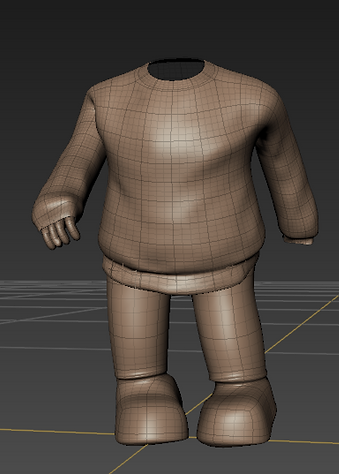
Face and hair


Another difficult aspect of creating my character is creating a head which as shown in my research has an enlarged head and eyes with the other features such as the mouth made to look smaller this is because eyes are seen as a focus point and used to express the emotion. When modelling my head I kept in consideration these aspects and managed to model a head that has these features although this was made in maya and transfered into Mudbox I had a lot of problems with the amount of polygons which cause my maya to lag
Modelling a basic monster figure:
Inspiration


Playing around with xgen

I wanted to experiment with Xgen and create fur for my monster rather than a simple basic texture, at first it seemed to work really well but it started to cause my computer to crash and lag which is why I did not keep the Xgen fur although i do like the way you can groom the hair into shape.
This technique could really spruce up my models and create detail where there isn't since the model was fairly simple the hair could also create interesting shadows formed in the window due to the different length and position of hair which i think would work really well with my idea.

Basic monster model
At first I wanted to create a somewhat more detailed model of a monster but after I looked into the way I wanted my scene to lay out I realised that all i need is to get an intricate shadow on the floor meaning I can use less polygons and still achieve the image I wanted, which is why I started to look into very simple models of monsters and soon began to model my own using Maya and extruding polygons by adjusting the size and length till i get to my desired look. Since this would create a very block like look I had to first smooth out my model and then work with that .

Arnold rendering:


What I wanted to create is a sequence of images that show off my based story of the girl and the monster within a scene which ended up in being more of magical visit of the monster to the girl. In the first image here I want to emphasise fully on the bedroom but include a slight shadow of a figure within the window which creates a feeling of there being something else within the scene too which will slowly be revealed within the next scenes
In this image I wanted to slowly reveal my character without the audience knowing what is actually happening in the scene, I also wanted to make sure there still is a unique shadow forming on the window light with the scene being mostly dark but i wanted more of a blue like feel to the actual lighting of the scene which is something that is a fairly strong aspect within most animated film night scenes this emphasises the idea of the scene being made in the night without it being pitch black and loosing the cartoon like feel.

In this image I wanted to fully show the the main character which seems to be standing outside the window looking out into something which is yet still unknown. In the next image i wanted to show the monster itself but before I played around with different render techniques such as maya vector and also wanted to create more of a blue feel to the scene as it currently seems rather too dark with barely any blue hint in it


Maya Vector
When trying out maya vector I straight away noticed that the textures have lost detail and became flat colours which created a very plain flat and 2D look which looked good as a scene but is not something id like to have as a final project since I lose all the lighting within the scene a lot of the depth in the image is lost. In the end this is a cartoon like render but is no where near what I was hoping to achieve at the end of my projects since its only a flat 2D image with flat colours and a black outline.


Monster Alpha map
Instead of creating a 3D model of a monster which had significantly slowed down my computer and when wanting to create a very low poly model of a monster which did not show up well on the renders. I decided to create an alpha map on Photoshop to use as a texture on plane which allows light to pass around the outside creating a monster look that forms shadows on the floor just like a 3D model should. I decided to use this idea as it worked well when creating shadows and did not slow down my PC
Final renders
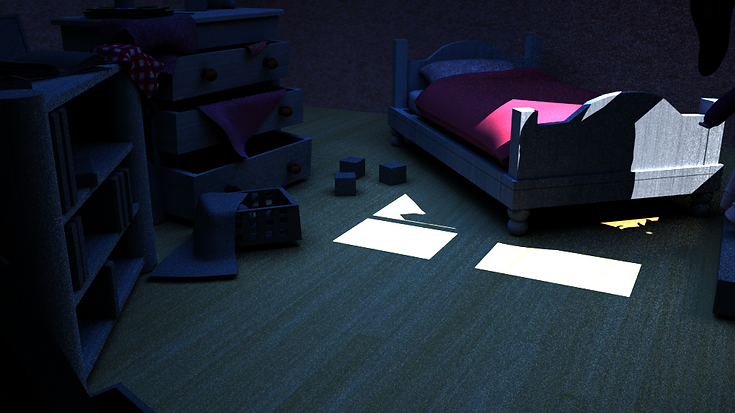


Once I have achieved my desired look with all the correct lighting in the scene I have then rendered my scene with the Arnold renderer while playing around with the setting such as 'AA' to increase the quality of the renders produced. Once the renders were made I adjusted both the brightness and contrast to better show off my model while still keeping it fairly dark. I initially wanted to render out 4 different images but soon noticed that the two in the middle were fairly similar so i decided to merge those two and create only 3 different renders.
Evaluation:
Looking at my final project 'Creature' there are a few things that I can notice straight away which I would like to improve and or change, although I believe my project has really good models that express my starting point idea and seems to work well with the initial blue lighting and finally holds this cartoon like atmosphere one of the things I’d like to improve is the actual monster itself since the initial black Photoshop image did not show up in the renders as well as it could have been if I only included a few different light sources that could brighten up the monster while still looking like he is in the darkness of the night. Initially my idea was to create two 3D models of the actual character and monster but seemingly the more I tried creating a very detailed monster my PC would get slower and slower and crash as soon as i wanted to combine him with scene so I came across the idea by just making my own Photoshop drawing of a monster to use as a silhouette within the scene by texturing a plane with the two alpha maps to allow light to pass through the plane.
Secondly I would want to render out a video rather than making a few images that try to show a story the video could slowly show different parts of the room to create a story as the process of rendering out a video will create a smooth finish and a clear understanding of what is happening in the scene rather than just a few renders that are not as clear as to what a video could produce, this could be easily done by setting up a camera to rotate around my character which I was not able to do due to the fact I ran out of time to be able to render out my scene overnight.
Since I stated that I really wanted to exaggerate the story of the girl and the monster I could have used the background to help me achieve this such as creating first hand crayon childlike drawings of the monster to then be able to texture onto a plane and place around the scene to create a more atmospheric room which expresses my idea clearly
When comparing my bedroom to the bedroom from ‘Monsters Inc’ I realise that their bedroom has barely any free space especially when looking at the walls which in my model are very plain and basic, if I got to improve this model I would make sure to model objects across the walls such as picture frames, poster, drawings or even shelves with toys to fill up all the empty space.
During this project I was capable of really improving my Maya and Mudbox skills as I set myself a target of modelling 2 characters and a scene which turned out well although I had a few problems throughout the way. Since we have updated the Maya program to the 2017 version I got to experiment with trial and error the different effect I can create and what works well with my desired look. I was also capable of learning Ncloth which allowed me to create pillows duvets and random cloths throughout the scene by creating an Ncloth and an Ncloth collider which then after playing would fall against gravity, after I got my desired look I paused and then deleted history to keep the model in the desired shape.
In the making of my project I have researched into a lot of sources such as films, traditional art and actual professional 3D models used in the industry which have influenced me greatly during the making of my project and I believe is shown clearly, one of the sources that has influenced me the most is Pixar’s film ‘Monsters Inc’, as they are a well knows company which are known for creating 3D cartoon characters featured in their movies therefore comparing my work to theirs have allowed me to be ambitious towards how my model should like in comparison which have got me to this stage where I see similarities when comparing my model to theirs, my own model is not as well developed and may not be to the standard that they have but with more work into the texturing and aspects of the modelling it can be improved to be very similar and up to their standard.
Through the making of my project I have come across many problems but one of the most common is the amount of polygons used especially when in the making of the characters as I decided to take them into Mudbox where the number of polygons increase greatly but then resulting in a higher detailed model when comparing it to just a Maya model although thinking back I could have tried to achieve this desired look by simply texturing on the fine details rather than modelling them in and this would have decreased the amount of polygons within the model and increase the speed of my renders at the same time.
Another fairly big problem I had to face when modelling both my scene and character sis to keep in mind that I cannot make the models too realistic as this is supposed to be a cartoon theme which appeared to be a lot harder than anticipated due to extremely exaggerated character features which are difficult to achieve especially when trying to achieve a human form due to the fact it is extremely easy to go ahead and create a far more realistic model than the ones shown in my research.
Overall I really like the look of my final piece as it does in fact have a cartoonish feel and does seem to work well, I really like how the lighting creates appropriate shadows and emphasizes the whole 3D look, and since a few of the models aren’t really textured the lighting really does help bring the piece together and especially bring out the blue hint which is visible in cartoon night scenes, I am still able to improve greatly with the software’s used and create far more detailed models using all kinds of techniques which can all be done by experimenting with trial and error. When critically analyzing my work I am able to see the whole starting idea of the monster and the girl being in a somewhat frozen heist scene, which would then indicate that I have successfully achieved my target of modelling a frozen heist scene.